> ## Documentation Index
> Fetch the complete documentation index at: https://agent-docs.nineteen58.co.za/llms.txt
> Use this file to discover all available pages before exploring further.
# Reasoning Builder
> Create intelligent conversation flows with objectives and conditions
## Overview
The Reasoning Builder is a powerful visual tool that allows you to create sophisticated conversation flows for your AI agents. By combining objectives and conditions, you can guide your agent's responses and decision-making process based on user inputs and context.
## Key Concepts
### Objectives
Objectives are specific goals or instructions that tell your agent what to do at each stage of the conversation. An objective includes:
* **Label**: The name of the node in the chat graph
* **Model**: The AI model to use for this objective
* **Instructions**: The specific prompt or instructions for the AI to follow
* **Suggested Replies**: Optional predefined responses that can be shown to users as buttons
### Conditions
Conditions are decision points that determine the flow of conversation. They help your agent choose the next appropriate objective based on:
* User input
* Conversation context
* Contact information
* Previous interactions
## Building Your First Flow
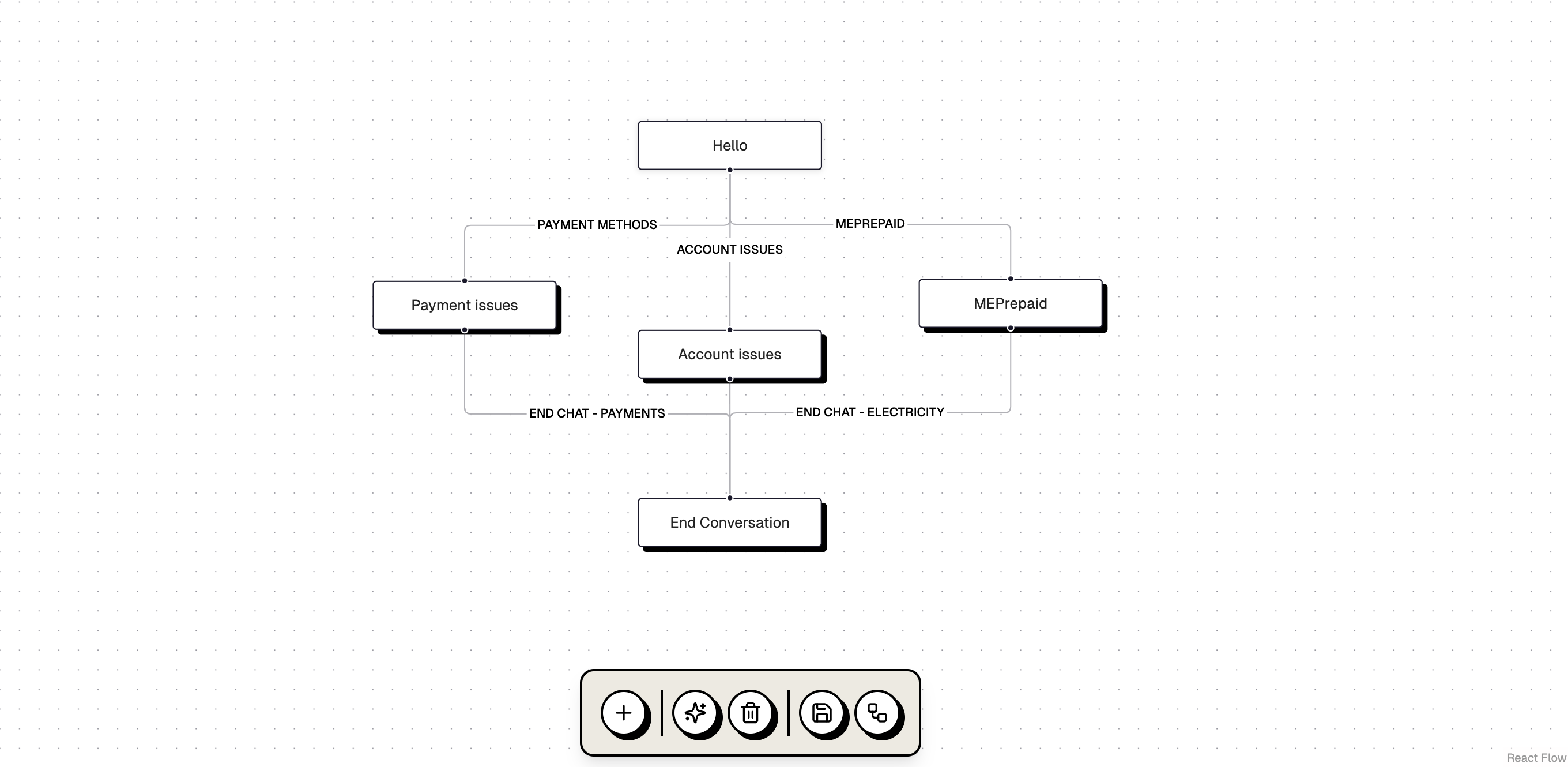
Let's create a simple customer service flow:
1. **Start with a Greeting**
* Create an objective node labeled "Hello"
* Set instructions like "Greet the user and ask how you can help"
* Choose your preferred AI model
2. **Add Decision Points**
* Create conditions to branch the conversation
* Example conditions:
* "Payment Methods" - triggers when users ask about payments
* "Account Issues" - handles account-related queries
* "MEPrepaid" - manages prepaid utility questions
3. **Connect the Nodes**
* Use edges to connect objectives and conditions
* Label edges to help understand the flow
* Create multiple paths for different scenarios
 ## Best Practices
### Writing Effective Instructions
* Be specific and clear
* Include context about available actions
* Define the scope of responses
* Consider edge cases
### Organizing Your Flow
* Keep it modular
* Group related objectives
* Use clear naming conventions
* Test different paths
### Using Conditions Effectively
* Make conditions mutually exclusive when possible
* Use specific triggers
* Consider fallback paths
* Test edge cases
## Advanced Features
### Context Awareness
Your agent can maintain context throughout the conversation by:
* Remembering previous interactions
* Accessing contact information
* Using conversation history
### Dynamic Responses
Configure your agent to:
* Suggest relevant replies
* Adapt to user preferences
* Handle multiple topics in one flow
* Escalate to human agents when needed
## Testing Your Flow
Before deploying:
1. Use the Test button to simulate conversations
2. Try different user inputs
3. Verify all paths work as expected
4. Check condition triggers
5. Test fallback scenarios
## Next Steps
* Learn about [Models](/docs/essentials/models) available for your agents
* Explore [Channel Integration](/docs/essentials/channels) to deploy your agent
* Discover how to add [Tools](/docs/essentials/tools) to enhance capabilities
## Best Practices
### Writing Effective Instructions
* Be specific and clear
* Include context about available actions
* Define the scope of responses
* Consider edge cases
### Organizing Your Flow
* Keep it modular
* Group related objectives
* Use clear naming conventions
* Test different paths
### Using Conditions Effectively
* Make conditions mutually exclusive when possible
* Use specific triggers
* Consider fallback paths
* Test edge cases
## Advanced Features
### Context Awareness
Your agent can maintain context throughout the conversation by:
* Remembering previous interactions
* Accessing contact information
* Using conversation history
### Dynamic Responses
Configure your agent to:
* Suggest relevant replies
* Adapt to user preferences
* Handle multiple topics in one flow
* Escalate to human agents when needed
## Testing Your Flow
Before deploying:
1. Use the Test button to simulate conversations
2. Try different user inputs
3. Verify all paths work as expected
4. Check condition triggers
5. Test fallback scenarios
## Next Steps
* Learn about [Models](/docs/essentials/models) available for your agents
* Explore [Channel Integration](/docs/essentials/channels) to deploy your agent
* Discover how to add [Tools](/docs/essentials/tools) to enhance capabilities