> ## Documentation Index
> Fetch the complete documentation index at: https://agent-docs.nineteen58.co.za/llms.txt
> Use this file to discover all available pages before exploring further.
# Tools
> Enhance your AI agents with external tools and API integrations
## Overview
Tools allow your AI agents to interact with external services and perform actions beyond simple conversation. Nineteen58 Agents provides both pre-built integrations and custom API capabilities.
## Pre-built Tools
### Payments
Enable your agent to handle payment processing and transactions:
* Process payments
* Check payment status
* Handle refunds
* Verify transactions
### File Search
Allow your agent to search and retrieve information from your documents:
* Search through files
* Extract specific information
* Access document metadata
* Share relevant content
### Bookings
Manage appointments and scheduling:
* Create appointments
* Check availability
* Modify bookings
* Send confirmations
### DocuSign
Handle document signing workflows:
* Send documents for signature
* Check signing status
* Manage templates
* Process completed documents
### DocsAutomator
Automate document creation and management:
* Generate documents
* Fill templates
* Process forms
* Manage document workflow
### Conversation Fillers
Enhance conversation flow with contextual responses:
* Handle small talk
* Maintain engagement
* Provide transitional phrases
* Manage conversation gaps
## Custom Webhooks
Create custom integrations with any API endpoint using our webhook builder.
### Setting Up a Webhook
1. Navigate to the Tools section
2. Click "Add" in the Webhooks section
3. Configure your webhook:
* Name: Identify your webhook
* Description: Document its purpose
* Endpoint: API URL
* Method: GET/POST/PUT/DELETE
* Headers: Authentication and content type
* Query Parameters: URL parameters
* Schema: Request/response structure
### Creating API Schemas
Use the Schema Builder to define the structure of your API requests and responses.
Example Schema:
```json theme={null}
{
"type": "object",
"properties": {
"customer_id": {
"type": "string",
"description": "Unique identifier for the customer",
"required": true
},
"order_details": {
"type": "object",
"properties": {
"product_id": {
"type": "string",
"description": "Product identifier"
},
"quantity": {
"type": "integer",
"description": "Quantity of the product"
},
"total_price": {
"type": "number",
"description": "Total price of the order"
}
},
"required": ["product_id", "quantity", "total_price"]
}
},
"required": ["customer_id", "order_details"]
}
```
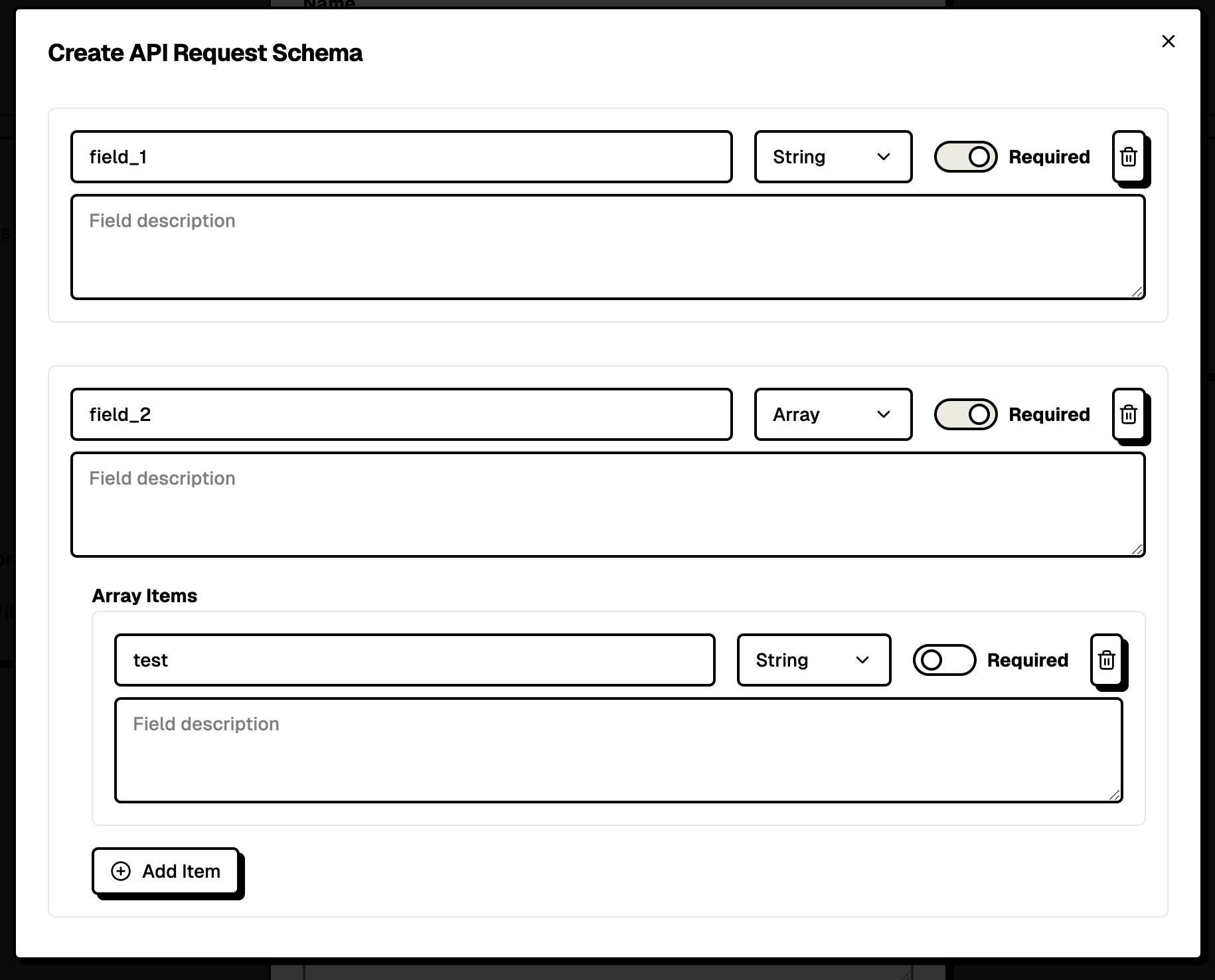
### Schema Builder Interface
The Schema Builder provides a user-friendly interface to:
* Add fields with names and types
* Set field descriptions
* Mark required fields
* Create nested objects
* Define arrays and complex types
 ## Best Practices
### Tool Configuration
1. **Clear Naming**: Use descriptive names for tools and webhooks
2. **Detailed Documentation**: Provide clear descriptions for each integration
3. **Test Thoroughly**: Verify tool functionality before deployment
4. **Monitor Usage**: Track tool performance and usage patterns
### API Integration
1. **Authentication**: Securely manage API credentials
2. **Error Handling**: Define fallback behaviors
3. **Rate Limiting**: Be aware of API limits
4. **Response Validation**: Verify API responses match schema
### Webhook Management
1. **Organize Webhooks**: Group related functionalities
2. **Version Control**: Track API version changes
3. **Security**: Use HTTPS endpoints only
4. **Maintenance**: Regularly verify endpoint availability
## Security Considerations
* All webhooks must use HTTPS
* Store sensitive credentials securely
* Implement proper authentication
* Regular security audits
* Monitor for unusual patterns
## Troubleshooting
Common issues and solutions:
* **Webhook Failures**: Check endpoint availability and authentication
* **Schema Mismatches**: Verify API response matches defined schema
* **Rate Limiting**: Implement proper request spacing
* **Authentication Issues**: Verify credential validity
## Next Steps
* Explore [Advanced Voice](/docs/essentials/channels#advanced-voice) for voice-enabled tools
* Set up [Monitoring](/docs/essentials/monitoring) for tool performance
## Best Practices
### Tool Configuration
1. **Clear Naming**: Use descriptive names for tools and webhooks
2. **Detailed Documentation**: Provide clear descriptions for each integration
3. **Test Thoroughly**: Verify tool functionality before deployment
4. **Monitor Usage**: Track tool performance and usage patterns
### API Integration
1. **Authentication**: Securely manage API credentials
2. **Error Handling**: Define fallback behaviors
3. **Rate Limiting**: Be aware of API limits
4. **Response Validation**: Verify API responses match schema
### Webhook Management
1. **Organize Webhooks**: Group related functionalities
2. **Version Control**: Track API version changes
3. **Security**: Use HTTPS endpoints only
4. **Maintenance**: Regularly verify endpoint availability
## Security Considerations
* All webhooks must use HTTPS
* Store sensitive credentials securely
* Implement proper authentication
* Regular security audits
* Monitor for unusual patterns
## Troubleshooting
Common issues and solutions:
* **Webhook Failures**: Check endpoint availability and authentication
* **Schema Mismatches**: Verify API response matches defined schema
* **Rate Limiting**: Implement proper request spacing
* **Authentication Issues**: Verify credential validity
## Next Steps
* Explore [Advanced Voice](/docs/essentials/channels#advanced-voice) for voice-enabled tools
* Set up [Monitoring](/docs/essentials/monitoring) for tool performance